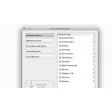
It works with AirPort cards, MacWireless 11g PC Cards, and 11g PCI cards and displays the name of the network and strength of the signal.
However, it isn't very effective at all. My Mac's AirPort card found twice as many networks in my area than AirPort Radar Widget did indicating that is not 100% reliable.
If you do find an open network using AirPort Radar Widget it will let you connect to it just by double clicking on it. It also remembers "lost networks" so that even if it doesn't appear on your network list immediately, you should still be able to connect to it.
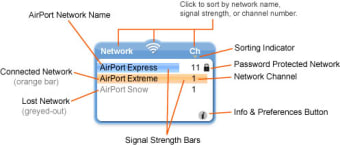
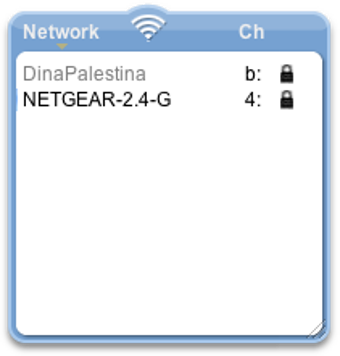
When a network is too weak to connect to, it is greyed-out - strong signals are highlighted in bold.
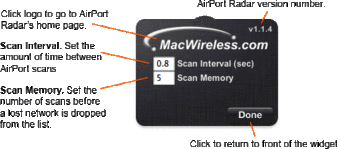
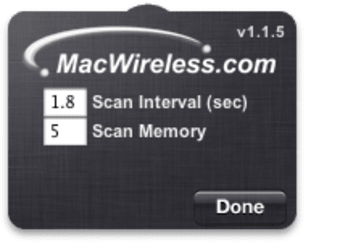
There are virtually no preferences in AirPort Radar Widget except the ability to choose how many scans a lost network stays on-screen with the Scan Memory setting on the back of the widget.
Pros
Allows you to connect to open networks
Cons
Doesn't display all the networks that it should do
Not as reliable as AirPort
AirPort Radar is a free and convenient tool for quickly scanning the area for AirPort and other wireless networks. It will work with AirPort cards, MacWireless 11g PC Cards, and 11g PCI cards.
Signal Strength at a Glance
Visual signal meters tell you the strength of the AirPort signal for an easy-to-read radar screen.
Sortable Network List
Click on a category to sort the list of networks by that category.
Click on the radio waves symbol to sort by signal strength.
Connect to Open Networks
By simply clicking on the name you can connect to any network that is not password protected.
Remember Lost Networks
When a network falls "below radar" it won't disappear from your radar screen right away. This is particularly useful when a network is right on the threshold - with AirPort Radar it won't jump on and off the radar screen, it will just turn grey temporarily while it is too weak to connect to.
You can choose how many scans a lost network stays on-screen with the "Scan Memory" setting on the back side of the widget.
Auto-Resizing for Various List Lengths
The AirPort Radar widget will automatically resize itself to accomodate longer or shorter lists of wireless networks.
Doesn't work, plain and simple. Installed on Mac OS 10.5.8, 2.53 GHz MacBook Pro 4GB RAM. In an environment with 10 or so WiFi networks, it lists one, with no strength meter, and the wrong channel. Pros: Nice interface, if it worked. Cons: Doesn't work
Laws concerning the use of this software vary from country to country. We do not encourage or condone the use of this program if it is in violation of these laws. Softonic may receive a referral fee if you click or buy any of the products featured here.